> ## Documentation Index
> Fetch the complete documentation index at: https://trigger-docs-max-duration.mintlify.site/llms.txt
> Use this file to discover all available pages before exploring further.
# Run metadata
> Attach a small amount of data to a run and update it as the run progresses.
You can attach up to 4KB (4,096 bytes) of metadata to a run, which you can then access from inside the run function, via the API, and in the dashboard. You can use metadata to store additional, structured information on a run. For example, you could store your user’s full name and corresponding unique identifier from your system on every task that is associated with that user.
## Usage
Add metadata to a run by passing it as an object to the `trigger` function:
```ts
const handle = await myTask.trigger(
{ message: "hello world" },
{ metadata: { user: { name: "Eric", id: "user_1234" } } }
);
```
Then inside your run function, you can access the metadata like this:
```ts
import { task, metadata } from "@trigger.dev/sdk/v3";
export const myTask = task({
id: "my-task",
run: async (payload: { message: string }) => {
const user = metadata.get("user");
console.log(user.name); // "Eric"
console.log(user.id); // "user_1234"
},
});
```
You can also update the metadata during the run:
```ts
import { task, metadata } from "@trigger.dev/sdk/v3";
export const myTask = task({
id: "my-task",
run: async (payload: { message: string }) => {
// Do some work
await metadata.set("progress", 0.1);
// Do some more work
await metadata.set("progress", 0.5);
// Do even more work
await metadata.set("progress", 1.0);
},
});
```
You can get the current metadata at any time by calling `metadata.get()` or `metadata.current()` (again, only inside a run):
```ts
import { task, metadata } from "@trigger.dev/sdk/v3";
export const myTask = task({
id: "my-task",
run: async (payload: { message: string }) => {
// Get the whole metadata object
const currentMetadata = metadata.current();
console.log(currentMetadata);
// Get a specific key
const user = metadata.get("user");
console.log(user.name); // "Eric"
},
});
```
You can update metadata inside a run using `metadata.set()`, `metadata.save()`, or `metadata.del()`:
```ts
import { task, metadata } from "@trigger.dev/sdk/v3";
export const myTask = task({
id: "my-task",
run: async (payload: { message: string }) => {
// Set a key
await metadata.set("progress", 0.5);
// Update the entire metadata object
await metadata.save({ progress: 0.6 });
// Delete a key
await metadata.del("progress");
},
});
```
Any of these methods can be called anywhere "inside" the run function, or a function called from the run function:
```ts
import { task, metadata } from "@trigger.dev/sdk/v3";
export const myTask = task({
id: "my-task",
run: async (payload: { message: string }) => {
await doSomeWork();
},
});
async function doSomeWork() {
await metadata.set("progress", 0.5);
}
```
If you call any of the metadata methods outside of the run function, they will have no effect:
```ts
import { metadata } from "@trigger.dev/sdk/v3";
// Somewhere outside of the run function
async function doSomeWork() {
await metadata.set("progress", 0.5); // This will do nothing
}
```
This means it's safe to call these methods anywhere in your code, and they will only have an effect when called inside the run function.
Calling `metadata.current()` or `metadata.get()` outside of the run function will always return
undefined.
These methods also work inside any task lifecycle hook, either attached to the specific task or the global hooks defined in your `trigger.config.ts` file.
```ts myTasks.ts
import { task, metadata } from "@trigger.dev/sdk/v3";
export const myTask = task({
id: "my-task",
run: async (payload: { message: string }) => {
// Your run function work here
},
onStart: async () => {
await metadata.set("progress", 0.5);
},
onSuccess: async () => {
await metadata.set("progress", 1.0);
},
});
```
```ts trigger.config.ts
import { defineConfig, metadata } from "@trigger.dev/sdk/v3";
export default defineConfig({
project: "proj_1234",
onStart: async () => {
await metadata.set("progress", 0.5);
},
});
```
## Metadata propagation
Metadata is NOT propagated to child tasks. If you want to pass metadata to a child task, you must do so explicitly:
```ts
import { task, metadata } from "@trigger.dev/sdk/v3";
export const myTask = task({
id: "my-task",
run: async (payload: { message: string }) => {
await metadata.set("progress", 0.5);
await childTask.trigger(payload, { metadata: metadata.current() });
},
});
```
## Type-safe metadata
The metadata APIs are currently loosely typed, accepting any object that is JSON-serializable:
```ts
// ❌ You can't pass a top-level array
const handle = await myTask.trigger(
{ message: "hello world" },
{ metadata: [{ user: { name: "Eric", id: "user_1234" } }] }
);
// ❌ You can't pass a string as the entire metadata:
const handle = await myTask.trigger(
{ message: "hello world" },
{ metadata: "this is the metadata" }
);
// ❌ You can't pass in a function or a class instance
const handle = await myTask.trigger(
{ message: "hello world" },
{ metadata: { user: () => "Eric", classInstance: new HelloWorld() } }
);
// ✅ You can pass in dates and other JSON-serializable objects
const handle = await myTask.trigger(
{ message: "hello world" },
{ metadata: { user: { name: "Eric", id: "user_1234" }, date: new Date() } }
);
```
If you pass in an object like a Date, it will be serialized to a string when stored in the
metadata. That also means that when you retrieve it using `metadata.get()` or
`metadata.current()`, you will get a string back. You will need to deserialize it back to a Date
object if you need to use it as a Date.
We recommend wrapping the metadata API in a [Zod](https://zod.dev) schema (or your validator library of choice) to provide type safety:
```ts
import { task, metadata } from "@trigger.dev/sdk/v3";
import { z } from "zod";
const Metadata = z.object({
user: z.object({
name: z.string(),
id: z.string(),
}),
date: z.coerce.date(), // Coerce the date string back to a Date object
});
type Metadata = z.infer;
// Helper function to get the metadata object in a type-safe way
// Note: you would probably want to use .safeParse instead of .parse in a real-world scenario
function getMetadata() {
return Metadata.parse(metadata.current());
}
export const myTask = task({
id: "my-task",
run: async (payload: { message: string }) => {
const metadata = getMetadata();
console.log(metadata.user.name); // "Eric"
console.log(metadata.user.id); // "user_1234"
console.log(metadata.date); // Date object
},
});
```
## Inspecting metadata
### Dashboard
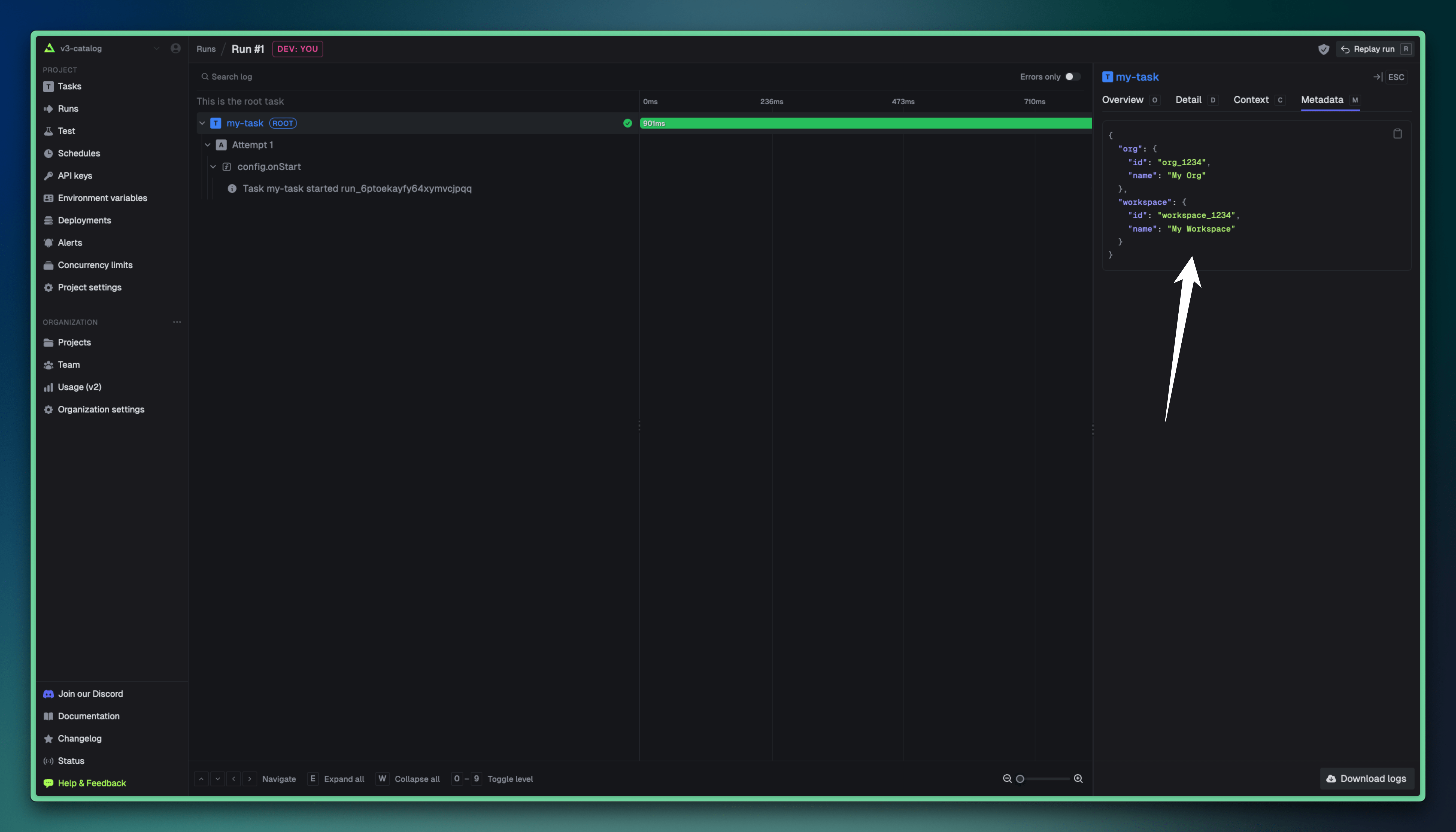
You can view the metadata for a run in the Trigger.dev dashboard. The metadata will be displayed in the run details view:
### API
You can use the `runs.retrieve()` SDK function to get the metadata for a run:
```ts
import { runs } from "@trigger.dev/sdk/v3";
const run = await runs.retrieve("run_1234");
console.log(run.metadata);
```
See the [API reference](/management/runs/retrieve) for more information.
## Size limit
The maximum size of the metadata object is 4KB. If you exceed this limit, the SDK will throw an error. If you are self-hosting Trigger.dev, you can increase this limit by setting the `TASK_RUN_METADATA_MAXIMUM_SIZE` environment variable. For example, to increase the limit to 16KB, you would set `TASK_RUN_METADATA_MAXIMUM_SIZE=16384`.